A world clock in your
Mac menu bar.
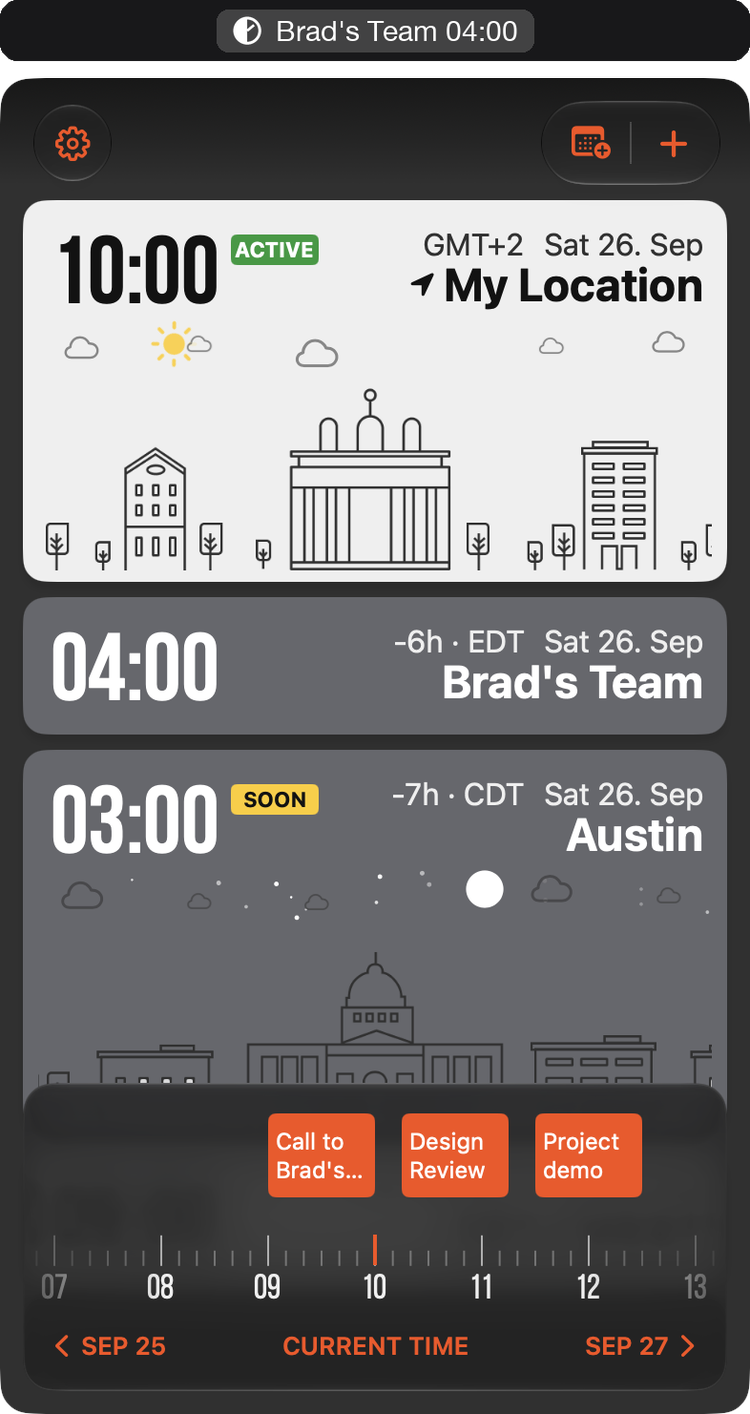
See what time it is for your team without leaving what you’re doing. GlobeTempus+ for Mac lives next to your clock and syncs with your iPhone and iPad.
Your cities next to your clock
Keep the time of the people you work with right in the macOS menu bar. One click opens the full world clock with the same city cards, timeline and calendar as on iPhone.
What’s in the Mac app
Times in the menu bar
Pick the locations you want to see without opening anything.
Full world clock on click
City cards, working hours, holidays and the timeline in a window under the menu bar.
Synced with iPhone and iPad
Your locations come along through your own iCloud. No account.
One purchase, every device
The full version unlocks on iPhone, iPad and Mac together.
Questions
How do I show multiple time zones in the Mac menu bar?
Install GlobeTempus+ from the App Store, add the cities you need, and choose which of them appear in the menu bar. Clicking the menu bar item opens the full world clock.
What are the requirements?
The Mac app needs macOS 27 or later on a Mac with Apple silicon.
Do my cities sync with my iPhone?
Yes. Your locations sync between Mac, iPhone and iPad through your own iCloud account, with no sign-up.
Stop doing the timezone math.
Free to download with two locations, three people and one alarm. One purchase unlocks everything on iPhone, iPad and Mac.